Free · PowerShell 7 · runs on your machine
Find the AI agents in your tenant
Download it, point it at Microsoft 365, get a scored inventory. Read-only. Nothing leaves your tenant.
Free to download and run. No licence key, no account, no telemetry.
Run it
Three commands
Unpack and start
# PowerShell 7
pwsh ./Start-APOnboarding.ps1
Checks your prerequisites and walks you through consent.
Collect
pwsh ./collector/Invoke-AgentPerimeterCollector.ps1
Reads Entra, Agent 365, Defender and Copilot Studio. Read scopes only.
Look at it
pwsh ./ui/Start-APBrowserUI.ps1
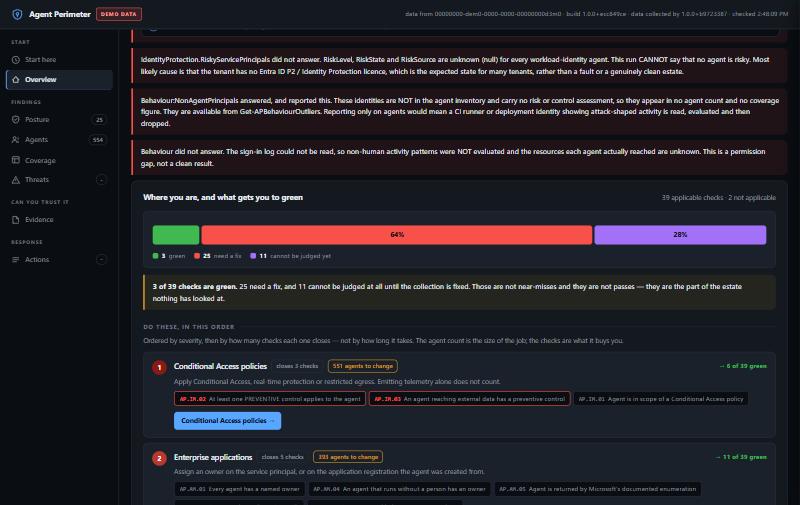
Opens the panel above on 127.0.0.1. Nothing is published.
No install, no service, no agent on an endpoint. Try it first with -Demo, which needs no tenant at all.
See it
It tells you what to do next
Findings ordered by how many checks each one closes, with the agent count beside it, so the biggest fix is the first line.
The part other tools get wrong
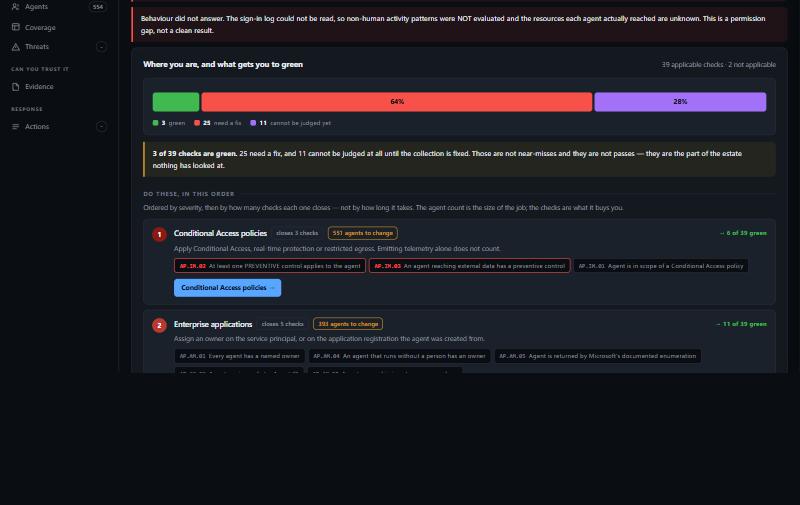
A check that could not run is not a pass
Every check records whether its input was actually readable. If it was not, the check says so. It never scores you green for data nobody read.
What it checks
41 checks, 7 of 7 Microsoft AI controls
Four sources, one list
Entra agent identities, Agent 365, Defender and Copilot Studio, reconciled into one record per agent with the sources that saw it.
Mapped to MCSB v2
Identity, access, data protection, logging and the AI domain. Each check names its Microsoft control and who can make the change.
21 Sentinel rules
New sign-in address, ownerless model bridge, instruction overriding the platform, tool invoked with no approval. Deployed disabled.
HTML, Power BI, panel
One derived headline used everywhere, so the summary figure matches the table under it.
Impact before command
A script per failing check. Every command states what breaks before it appears, and arrives commented out.
Scheduled or in CI
Azure Automation, or GitHub Actions and Azure DevOps with federated identity. Red build when posture slips.
FAQ
Before you download
Is it really free?
Yes. Download it, run it, keep the reports. No licence key, no account, no usage limit and nothing phones home. If you later want help reading the findings or fixing them, that is the paid part — the tool is not.
What access does it need?
Read scopes across Entra, audit logs, applications and policy, consented by a Global Administrator to an app registration in your own tenant. Assessment makes no changes. Write permissions are separate and only requested if you choose to remediate.
Where does my data go?
Nowhere. Collection writes to a file on your machine, or to your own Log Analytics workspace if you point it at one. There is no vendor cloud in the path. Agent instruction text is measured, never captured.
Do we need Copilot or Agent 365 licences?
No. It reads whatever your tenant exposes. Licensed sources add detail where you have them; where you do not, the affected checks report NOT CHECKED and name the licence that would answer them.
Can it break anything?
Not while assessing — that path makes no changes at all. Remediation can, by design, which is why every generated script states the user-facing impact above the command, previews by default, and needs an explicit flag to act.
Download it and look
Half an hour from download to a scored inventory of every agent in your tenant.
Questions, or want the findings walked through? hello@cbfive.com